Вікно Перегляд квитків показує перегляд квитків поточної відкритої гри .
Вікно може бути прикріплене до краю інших вікон програми або плаваюче над екраном.
За замовчуванням це вікно відкривається зліва.
Щоб керувати видимістю цього вікна, на головній панелі інструментів програми,
натисніть на вкладку Інтерфейс і в меню Видимість квитків виберіть потрібну позицію вікна.
Ви також можете використовувати операцію Drag & Drop: помістіть курсор миші на заголовок вікна Квиток, натисніть ліву кнопку миші, утримуючи її, і перетягніть вікно в потрібне місце.
У верхній частині вікна Квитка знаходиться панель інструментів з наступними кнопками

Переключити режим відображення номерів квитків
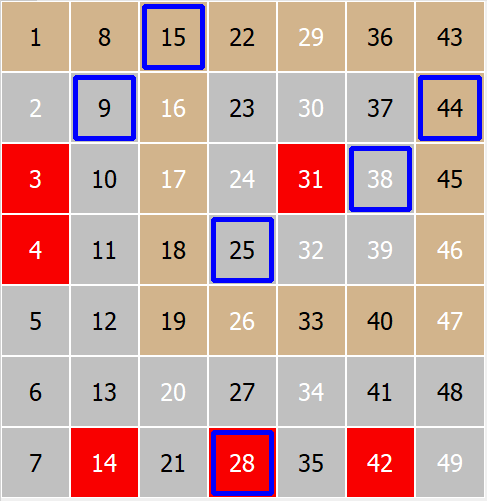
Тут ви можете перемикатися між режимами відображення номерів квитків у вікні Game Layout View .
Індивідуальні номери з жеребкування |
Номери, нанесені поверх попереднього тиражу, щоб побачити, як вони були витягнуті. |
|
|
< > |
|
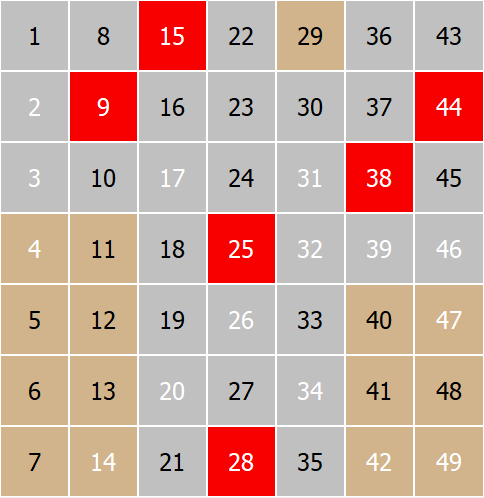
Друга кнопка зліва:
Переключити режим квитків Номери <> Сітка
Тут ви можете змінити вигляд квитків між видом "Схема гри " та видом "Сітка
Вид "Схема гри" показує всі спеціальні типи номерів, такі як Контактний, Зовнішній , Гарячий, Холодний , Непарний , Парний |
Вид сітки показує Підключені, Непідключені, Відключені номери |
|
|
< > |
|
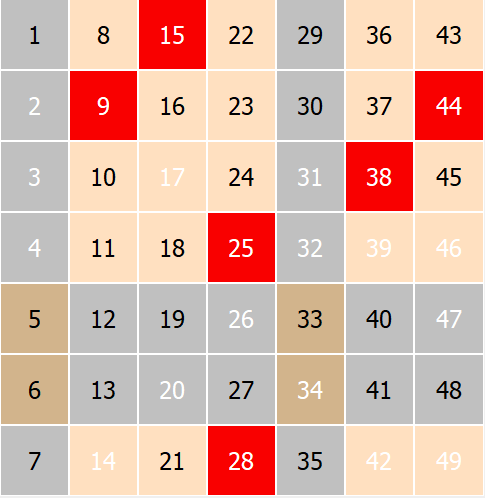
.
Numbers Menu
Show Contact
Select this button to show or hide Contact numbers on the Game Layout View.
The Contact numbers are shown in gray background and the Outside numbers remain in brown a Game Layout View.
Show Hot
Select this button to show or hide Hot numbers on the Game Layout View.
The Hot numbers are shown in white, and the Cold numbers remain in black on a Game Layout View.
Grid Menu
Show Lines
Select this button to show or hide grid lines numbers on the Game Layout View.
Show Connected
Select this button to show or hide Connected numbers on the Game Layout View.
The Connected numbers are shown in orange a Game Layout View.
Show Unconnected
Select this button to show or hide Unconnected numbers on the Game Layout View.
The Unconnected numbers are shown in gray background
The Disconnected numbers remain in brown background on a Game Layout View.
Please the Numbers Grid topic which describes the grid lines and other types of numbers.
Next button on the right side of grid menu is fit button
Fit To Window
Check this button to have Game Layout View fit into its window side permanently
If this button is unchecked then you can resize the Game Layout View manually. on the right side of the view, a small splitter will appear.
You can drag this splitter with a mouse on left and right to resize the view manually.
Previous Numbers and Next Numbers
Click on any of these buttons to see the previous or next game drawing.
Last Lottery Draw
Click this button to move the view to show the last lottery draw